If you want a smooth IPTV experience on a Smart TV, the app you choose matters just as much as the service itself. A good app can make channel browsing easier, improve playback stability, and simplify setup for the whole household. A poor one can lead to confusing menus, buffering, missing features, or constant login issues.
This guide walks through what to look for in the best IPTV apps for Smart TV, how to match an app to your TV brand, and what to do when streams do not load properly. Whether you are using Samsung, LG, Android TV, or another smart platform, the goal is the same: a simple setup and a better viewing experience.
If you are also comparing IPTV plans, it can help to review the basics first on our pricing page. And if you want to learn more about what makes a service easier to use, our why choose us page explains the approach behind IPTV for Lifetime.
What Makes a Good IPTV App for Smart TV?
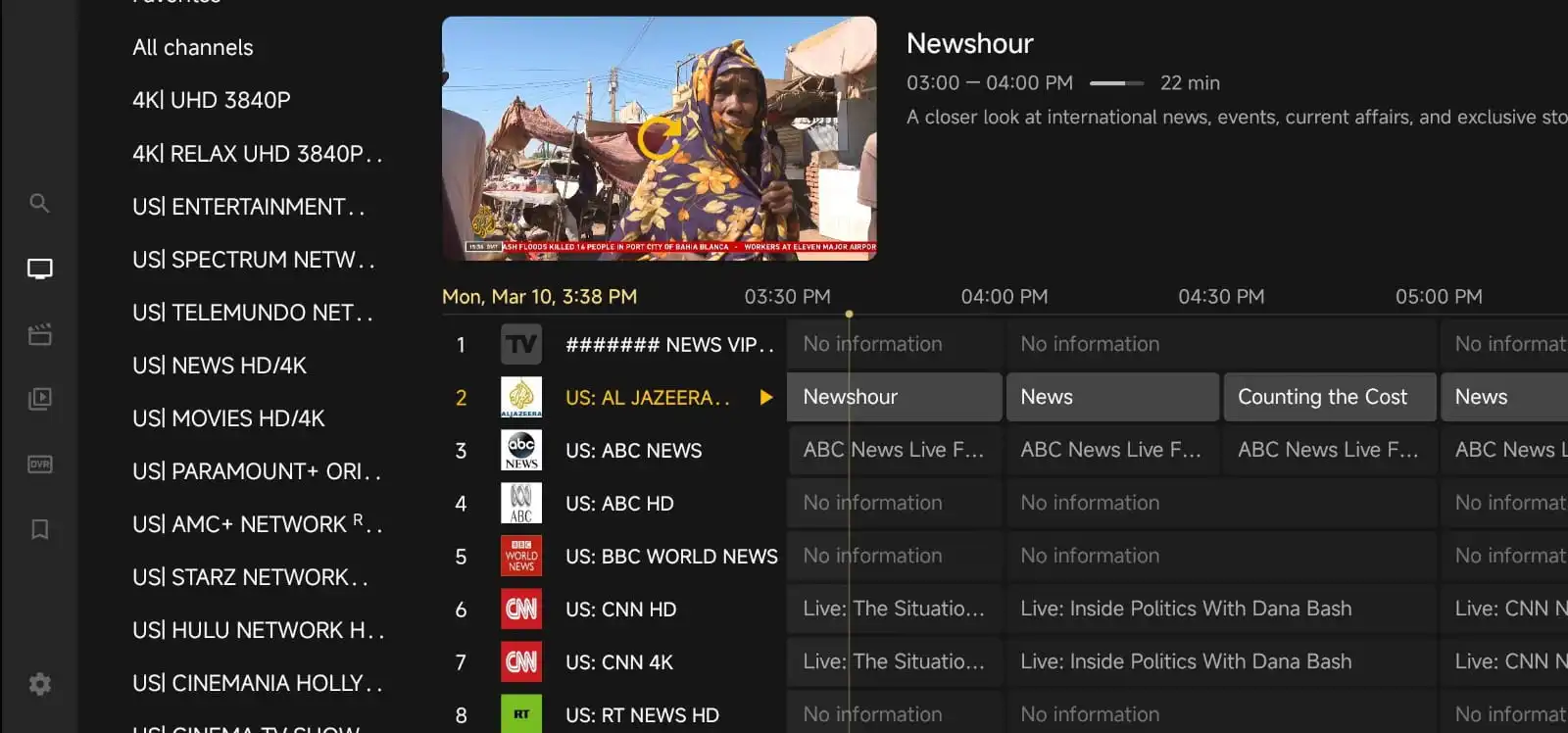
The best app is not always the one with the most features. For most viewers, a strong IPTV app should be easy to navigate, stable during playback, and compatible with your TV. A clean layout matters because Smart TV remotes are not as fast as a phone or keyboard. You want an app that lets you find live channels, categories, and favorites without digging through too many menus.
Look for these practical features:
- Simple interface: easy to browse with a remote control.
- Playlist support: works with M3U or portal-style login if your provider offers it.
- EPG support: shows program guides when available.
- Favorites and recent channels: saves time when you watch the same content often.
- Reliable playback: handles channel switching without freezing too much.
- Subtitle and audio options: useful for multilingual households.
It also helps if the app allows you to organize channels by category. Sports, movies, kids, and news are much easier to manage when they are clearly separated.
Check Your Smart TV Platform First
Before choosing an app, confirm what operating system your TV uses. Smart TVs are not all the same, and an app that works well on one brand may not be available on another.
Samsung TVs often use Tizen. LG TVs use webOS. Many Sony, TCL, Hisense, and Philips models run Android TV or Google TV. Some older models have limited app stores or older software versions, which can affect compatibility.
If your TV does not support the app you want, you may still have options. A streaming device can sometimes solve the problem, especially if your Smart TV store is limited or the app is no longer updated for your model.
Popular Types of IPTV Apps for Smart TV
There is no single app that is perfect for everyone, so it helps to understand the common types of IPTV apps available for Smart TVs.
1. Native Smart TV IPTV Apps
These apps are installed directly from the TV’s app store. They are convenient because you do not need extra hardware. If the app is well maintained, this can be the easiest setup. The downside is that availability depends on your TV brand and region, and some apps may be removed or updated less often.
2. Android TV and Google TV Apps
These are often the most flexible because Android-based TVs support a wide range of IPTV apps. They usually offer better customization and more choices for playlist management, EPG, and player settings. If you want more control, Android TV apps are often a strong option.
3. Apps for External Streaming Devices
Some viewers use a Smart TV app on the television itself. Others prefer a streaming stick or box connected through HDMI. This can be useful when the TV’s app store is limited or the built-in software feels slow. It can also make future app changes easier because you are not tied to the TV’s native system.
How to Choose the Right IPTV App for Your Needs
The best app for you depends on how you watch TV. A sports fan may want fast channel switching and a clear EPG. A family may care more about favorites, categories, and easy navigation. Someone who watches on multiple devices may want an app that handles playlists consistently across screens.
Ask yourself these questions before installing anything:
- Does the app support your TV brand and operating system?
- Can you add your IPTV login or playlist easily?
- Does it support EPG if your provider includes one?
- Is the menu simple enough for everyone in the house?
- Can you edit categories, favorites, or playback settings?
- Does it work well with your remote control?
It is also wise to think about long-term use. An app that looks good today may become frustrating if it is rarely updated. If you rely on IPTV daily, stability matters more than flashy design.
Smart TV Setup Tips for a Smoother Experience
Even a good app can feel slow if the setup is not right. A few small adjustments can make a big difference.
Start with a stable internet connection. Wi-Fi works for many homes, but if your TV is far from the router, a wired Ethernet connection may give better results. If Ethernet is not possible, place the router closer to the TV or use a stronger Wi-Fi band if your device supports it.
Keep your TV software updated. App compatibility can improve after a firmware update. If your TV has been ignoring updates for a long time, check the manufacturer’s settings menu.
Clear unused apps and cached data. Smart TVs can slow down when storage gets tight. Removing apps you do not use may help the IPTV app run more smoothly.
Use the correct player settings. Some apps let you change buffer size, video format, or external player options. If streams stutter, changing these settings can help more than reinstalling the app repeatedly.
Reboot the TV occasionally. A full restart can clear temporary glitches and restore better performance.
Common IPTV App Problems and How to Fix Them
Most IPTV issues on Smart TV are not caused by one single thing. They usually come from the app, the device, the internet connection, or the playlist source. Here are some common problems and practical fixes.
App crashes or will not open
This can happen after a software update or when the TV is low on memory. Try closing the app completely, restarting the TV, and checking for updates. If the problem continues, uninstall and reinstall the app if your TV allows it.
Channels do not load
First, confirm that your IPTV login or playlist details were entered correctly. A small typo in a username, password, or playlist URL can stop everything from working. If the app is correct but the channels still fail, test another app or check whether the provider’s server is having issues. If needed, you can look at our server status page for updates.
Buffering during playback
Buffering often points to connection quality, server load, or app settings. Try lowering video quality if the app allows it, switching from Wi-Fi to Ethernet, or closing other devices that are using the same internet connection. If only one channel buffers while others work, the issue may be with that stream rather than your TV.
EPG is missing or incomplete
Some apps need a manual EPG refresh. Others require the correct EPG link from your provider. If the guide is blank, make sure the app is synced properly and that the service includes guide data for the channels you are watching.
Audio and video are out of sync
Try changing the player mode or switching to a different built-in decoder if the app offers one. This issue can also appear when a stream is unstable, so testing another channel can help you narrow down the cause.
Buying Advice: What to Look for in an IPTV Service Alongside the App
A great Smart TV app is only one part of the experience. You also want a service that fits your household’s viewing habits. Before you buy, check whether the provider offers clear setup instructions, compatible login methods, and support if something goes wrong.
It is a good sign when a provider explains how to set up the service on different devices, rather than assuming every user already knows the process. That kind of support saves time, especially for first-time IPTV users.
At IPTV for Lifetime, many visitors start by comparing the plan details and then checking whether their TV or device will work smoothly with the app they prefer. If you have questions before subscribing, our contact page is the easiest place to reach out.
Best Practices for Families and Multi-TV Homes
If several people will use the same IPTV setup, choose an app that makes it easy to switch profiles, save favorites, and organize channels. A family-friendly setup should not require constant technical help.
Here are a few practical habits that help:
- Create favorite lists for each viewer’s preferred channels.
- Group channels by category so kids and adults can find content faster.
- Write down login details in a safe place.
- Test the app on each TV before relying on it daily.
- Keep one backup app in mind in case your first choice stops working well after an update.
If you use IPTV on multiple screens, consistency matters. An app that behaves well on one TV but feels clumsy on another can create a lot of unnecessary frustration.
When to Try a Different App
Sometimes the best fix is to switch apps. If you have already checked your internet, updated the TV, and confirmed your playlist details, but the experience is still poor, another app may work better on your device.
You might want to try a different app if:
- the current one crashes often
- the interface is too hard to use with a remote
- channel loading is consistently slow
- EPG support is unreliable
- the app has not been updated for your TV model
It is normal to test more than one option. The right app is the one that feels stable and easy to use in your home, not the one with the most hype.
Final Thoughts
Finding the best IPTV apps for Smart TV is really about matching the app to your device, your viewing habits, and your tolerance for setup complexity. A good app should make IPTV feel simple, not technical. It should help you browse channels quickly, play streams reliably, and keep everyday use easy for the whole household.
If you are choosing a service at the same time, take a minute to review the plan details, confirm device compatibility, and make sure support is available when you need it. A little preparation now can save a lot of frustration later.
FAQ
What is the easiest IPTV app to use on a Smart TV?
The easiest app is usually the one with a clean layout, simple login steps, and good remote control navigation. The best choice depends on your TV brand and whether the app supports your playlist format.
Do all Smart TVs support IPTV apps?
No. Support depends on the TV’s operating system, app store, and software version. Some TVs can use IPTV apps directly, while others may need a streaming device.
Why does IPTV buffer on my Smart TV?
Buffering can happen because of weak Wi-Fi, app settings, overloaded networks, or stream issues. Try a wired connection, restart the TV, and check whether the problem affects all channels or only one.
Can I use more than one IPTV app on the same TV?
Yes, if your TV has storage and supports the apps you want. Many users keep one main app and one backup app in case of compatibility or playback issues.
Should I choose the app before the IPTV plan?
It is helpful to consider both at the same time. The app should work with your TV, and the service should provide the login method and support your app needs.